Part 2: The Engine Room — Cloud Architecture, RAG Mechanics, and Conversational Memory
By Saurabh Yadav
In Part 1 of this series, we explored the strategic foundation of the SQL chatbot using RAG pipeline, focusing on how enriched metadata and business logic solved the common pitfalls of AI hallucinations and data ambiguity. However, the true power of this solution lies in its “engine room”—a sophisticated, cloud-native architecture that orchestrates the flow of information from a massive data lake to a simple, conversational user interface.
Part 2 dives into the technical architecture, the internal mechanics of the Retrieval-Augmented Generation (RAG) pipeline, and the specific API routes that allow the system to handle both brand-new inquiries and complex follow-up questions.
The Architecture: What’s Running Under the Hood
Description: This figure illustrates the data-driven solution leveraging Azure services, showing the flow from the initial data engineering stage (ADF) through to the Python API orchestrator
The system is built entirely on Azure cloud services, chosen for their ability to handle large-scale data processing alongside AI workloads without requiring separate infrastructure for each.
Here’s what each component does and why it’s there:
Data ingestion and transformation: Raw data enters the system through Azure Data Factory (ADF) pipelines, which extract and reshape it into a structured, queryable format.
Centralized storage: All transformed data lives in Azure Data Lake (Gen2), stored in Parquet file format. Parquet is columnar, which allows for faster processing and lower storage costs.
High-Speed Analytics: Azure Synapse acts as the primary analytics engine. It is responsible for executing the SQL queries generated by the AI directly against the data lake to retrieve real-time results.
AI and Embedding Models: The system leverages Azure OpenAI, specifically utilizing GPT-4o as the Large Language Model (LLM) for query generation and the text-embedding-3-large model to convert natural language into numerical “vectors” that the computer can understand.
The Knowledge Hub: Azure Search AI serves as the system’s vector database. It stores the enriched JSONL documents (table and column schemas), the business logic index, and the library of few-shot examples that provide the AI with its operational context.
Description: This figure details the key components of the system’s memory, including the NL-SQL examples and the table, column, and business logic indexes.
Security and hosting. Secrets and API keys are managed through Azure Key Vault. The entire backend runs on Azure Web App, orchestrated by a Python application.
Each service has a focused job. Nothing in this stack is doing double duty — which matters for reliability and maintainability as the system scales.
How the RAG Pipeline Actually Works: Step by Step
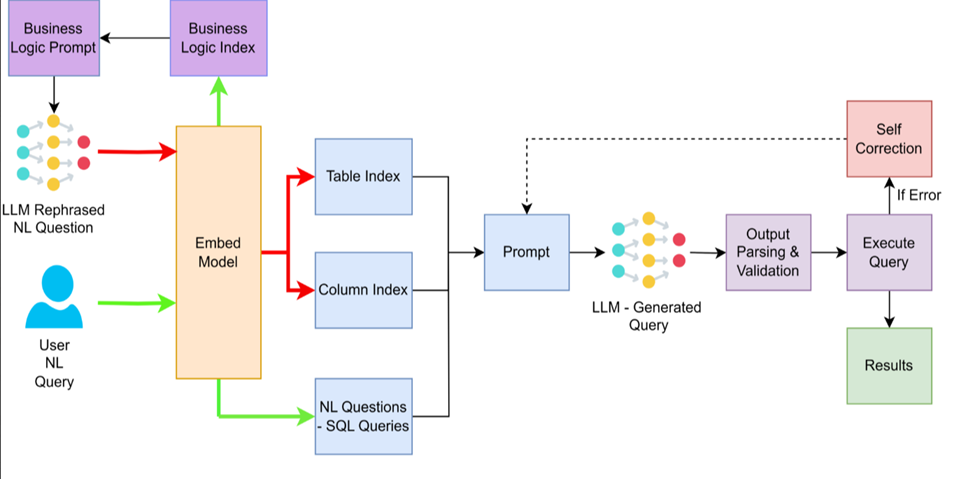
Description: RAG Architecture Of SQL Chatbot
The RAG (Retrieval-Augmented Generation) pipeline is the heart of the system. It ensures the model isn’t guessing — every SQL query it generates is grounded in the actual structure of the database and validated before execution.
Here’s the full flow from a user’s question to a downloadable result:
Step 1 — Question capture. The user types a natural language question into the interface.
Step 2 — Business logic rephrasing. Before anything else, the LLM rewrites the question using the business logic index from Part 1. This translates casual phrasing and internal terminology into something that maps cleanly onto the database’s technical structure.
Step 3 — Numerical Embedding. The rephrased query is passed through an Embed Model, turning the text into a vector.
Step 4 — Context retrieval. The vector is used to search the table and column indexes in Azure AI Search, surfacing only the parts of the 332-column schema that are actually relevant to this question. Simultaneously, the system retrieves few-shot examples that are semantically similar to what the user asked.
Step 5 — SQL generation. A specialized prompt is constructed using the matched tables, columns, few-shot examples, and the rephrased question. The LLM uses this context to write a precise SQL query.
Step 6 — Validation and execution. The generated SQL undergoes parsing and validation to ensure it is safe and correct. Once it clears, Synapse runs it against the data lake.
Step 7 — Delivery. The system identifies the number of records found and generates a secure download link for an Excel file containing the full dataset, which is stored in Azure Blob Storage.
The key insight here is that the model never works from memory alone. Every query is built from freshly retrieved, relevant context — which is exactly what makes RAG reliable for complex, domain-specific databases.
Conversational Intelligence: Managing Sessions and Follow-ups
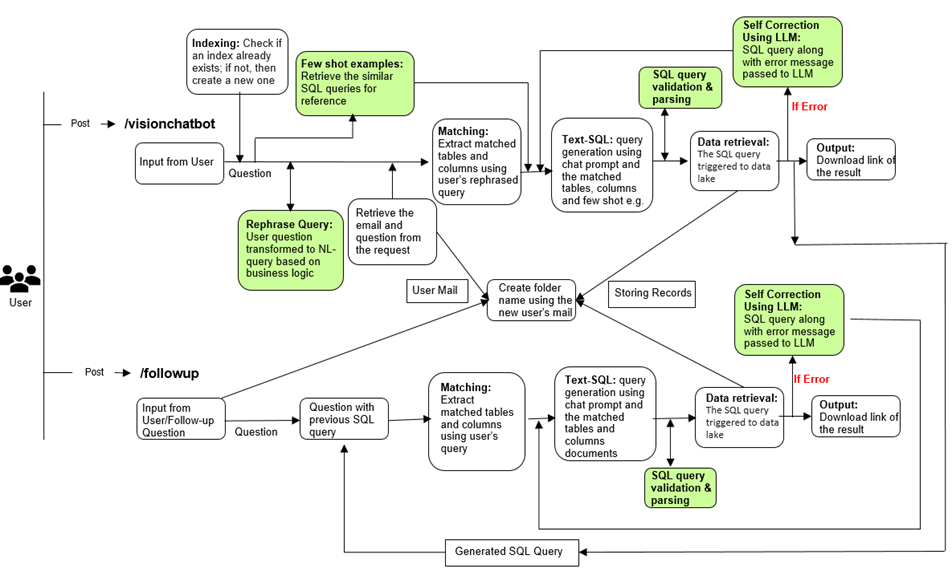
Description: It provides a high-level overview of how both the /visionchatbot and /followup routes function within the Flask application
Single-question chatbots are easy to demo. Real-world data analysis is almost never a single question — it’s a sequence: “Show me all projects in Germany” followed by “Now filter to only the active ones” followed by “Break that down by project type.”
This system handles that through two separate API routes and a session management layer visible in the architecture diagram above.
New queries (/visionchatbot). When a user asks a fresh question, this route kicks off the full seven-step pipeline described above. The user’s email is used to create a private session folder that persists their query history. If the query fails, the self-correction loop runs automatically — the LLM reads the error, revises the SQL, and retries.
Follow-up refinements (/followup). When the user wants to refine their previous results, this route takes over. It pulls the last SQL query from the user’s session, combines it with the new refinement request, and generates an updated query that builds on — rather than replacing — what came before. The validation and delivery steps run again, and the user gets a fresh Excel file with the updated data.
Session state is stored per user, so conversations are isolated and private. Each interaction is saved, meaning the system always has the full context of what was asked before.
Conclusion
Across both parts of this series, the architecture breaks down into three distinct layers:
- The knowledge layer — enriched JSONL schema, business logic index, few-shot examples (Part 1)
- The accuracy layer — validation, self-correction, and the four guardrails that prevent bad queries (Part 1)
- The execution layer — the cloud infrastructure, RAG pipeline mechanics, and session management (Part 2)
None of these layers works well without the others. A sophisticated pipeline running on a bad schema context still hallucinates. Excellent metadata with no validation layer still lets broken queries reach the database. The design holds together because all three reinforce each other.
The Bigger Takeaway
Building a SQL chatbot that actually works in production isn’t about finding the right model and pointing it at a database. It’s about building the right scaffolding around the model — structured knowledge it can retrieve, guardrails that catch mistakes, and conversational memory that makes multi-step analysis possible.
When those pieces are in place, the model stops being a liability and starts being genuinely useful. Non-technical users can ask real questions and get real answers, without waiting on anyone who knows SQL.
That’s the goal. And it’s achievable.