By Saurabh Yadav
How Do You Build a SQL Chatbot Using a RAG Pipeline?
Part 1: The Foundation — Data Challenges, Metadata Strategy, and Accuracy
Introduction
Imagine having a massive database packed with valuable information, project records, employee skills, and certifications. However, having data is not the same as having access.
Every time someone needs a quick insight, they are forced to rely on the Proposal Development support team to navigate complex databases manually. This created a critical bottleneck, slowing down the extraction of vital information and increasing operational dependency.
The question is: what if anyone could query their most complex data using simple, natural language?
That’s exactly the problem a SQL chatbot powered by a RAG (Retrieval-Augmented Generation) pipeline is designed to solve. This is Part 1 of a two-part series on how to build one, starting with the most important piece: the data foundation.
The Problem: Data Locked Behind Complexity
Large organizational databases are powerful but unfriendly to non-technical users. The specific database in this solution is a repository of project experience, employee skills, and professional qualifications consisting of 31 tables and 332 columns written in standard SQL DDL (Data Definition Language) format.
While this structure works perfectly for database systems, it creates several hard problems for an AI model trying to interpret natural language questions:
Context deficit: Standard SQL schemas do not provide enough context for an LLM to understand the “why” behind a table or column. A column named VW_CL means nothing without explanation.
AI hallucinations: Multiple tables often contained the same column names (such as “city”), leading the AI to pull data from the wrong source.
Ambiguity and overlap: Multiple tables often contained the same column names (such as “city”), leading the AI to pull data from the wrong source.
Broken joins: The AI struggled to create valid table joins, often failing to connect project data with employee data correctly.
The result? A model that confidently produced queries that didn’t work. Getting this right required rethinking how the AI was given information about the database in the first place.
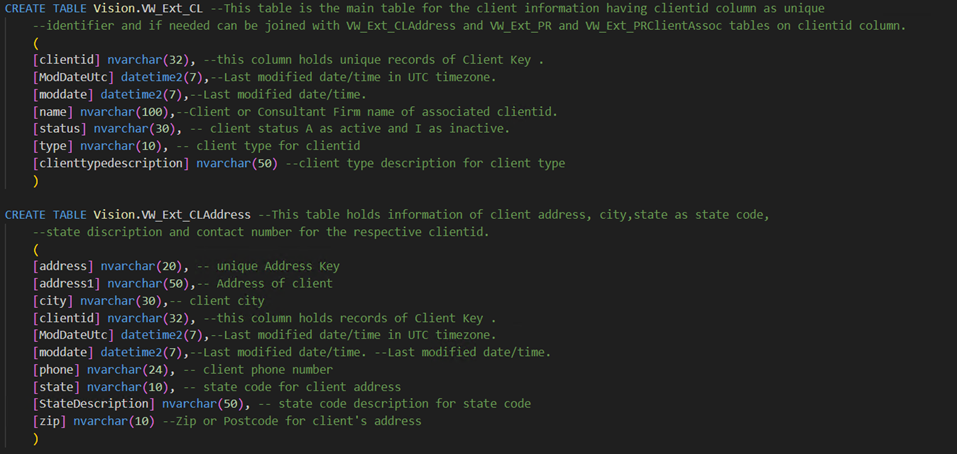
Description: A visual representation of the complex SQL DDL structure that the AI originally had to interpret.
The Fix: Metadata Enrichment via JSONL
The breakthrough came from moving away from raw SQL and converting the database schema into JSONL (JSON Lines) format — not just as a reformatting exercise, but as a full metadata enrichment exercise.
Think of it as writing a “field guide” to the database. Instead of just giving the AI a column name, you give it everything it needs to use that column correctly:
- Plain-language descriptions. Instead of VW_CL, the AI is told: “This is the main table for client information. The primary key is ClientID.”
- Explicit relationships. The schema now defines how tables connect — for example, VW_CL.ClientID = VW_CLAddress.ClientID — and what kind of relationship it is (one-to-many, etc.).
- Sample data. Every table description includes real examples. Knowing that a status column contains “A” for Active and “I” for Inactive helps the AI write correct filters instead of guessing.
Two JSONL files work together here — one focused on table-level information, the other on column-level detail. Together, they transform a technical database structure into a searchable knowledge base, something the AI can actually reason about.
Building for Accuracy: Four Layers That Matter
Even with a better schema, a professional SQL chatbot requires a framework to ensure its answers are 100% accurate. The SQL chatbot using the RAG pipeline employs four key “accuracy improvement” layers:
1. Few-shot examples The system is pre-loaded with a library of example question-and-SQL pairs — real questions mapped to their perfectly written SQL equivalents. These act as training anchors, showing the model the most efficient and correct way to query this specific database.

Description: Sample of Few Shot Examples
2. Business Logic and Concept Identification Every organization has its own vocabulary — internal terms, concepts, and shorthand that don’t map cleanly to column names. A business logic index acts as a domain-specific dictionary. It takes a user’s casual phrasing and translates it into a technically precise query requirement before the AI even starts writing SQL.
Description: Examples of how internal business terms are mapped to technical database requirements.
3. SQL validation and parsing Before any query is executed, it passes through a validation layer that checks whether the SQL is syntactically correct and compatible with the database. Bad queries are caught before they cause problems.
4. A self-correction loop When a query does fail at runtime, the system doesn’t just throw an error. It feeds the error message back to the LLM, which analyzes what went wrong, revises its approach, and retries — automatically, within seconds.
Conclusion
By the end of Part 1, the architecture has gone from a raw, AI-unfriendly SQL schema to a structured, enriched knowledge base that the model can navigate with confidence. The hallucinations are gone. The joins are correct. Business logic is handled automatically.
The takeaway so far: building a SQL chatbot isn’t primarily a model selection problem. It’s a data preparation problem. The model is only as good as the context you give it.
In Part 2, we will explore the technical “Engine Room”: the Azure cloud architecture, the RAG pipeline mechanics, and how the chatbot manages complex follow-up conversations.